Warning: Undefined variable $post in /home/c5987872/public_html/ylifesite.net/wp-content/themes/sango-theme-poripu/functions.php on line 7

Warning: Attempt to read property "ID" on null in /home/c5987872/public_html/ylifesite.net/wp-content/themes/sango-theme-poripu/functions.php on line 7

Warning: Undefined array key 4 in /home/c5987872/public_html/ylifesite.net/wp-content/themes/sango-theme-poripu/library/functions/prp_content.php on line 21

Warning: Undefined array key 4 in /home/c5987872/public_html/ylifesite.net/wp-content/themes/sango-theme-poripu/library/functions/prp_content.php on line 33

新規記事を募集中!ここから募集ページへ

【SharePoint】Webパーツ「クイックグラフ」


経済指標丸見え


Warning: Undefined array key 4 in /home/c5987872/public_html/ylifesite.net/wp-content/themes/sango-theme-poripu/library/functions/prp_content.php on line 21

Warning: Undefined array key 4 in /home/c5987872/public_html/ylifesite.net/wp-content/themes/sango-theme-poripu/library/functions/prp_content.php on line 33

Webパーツ「クイックグラフ」とは?
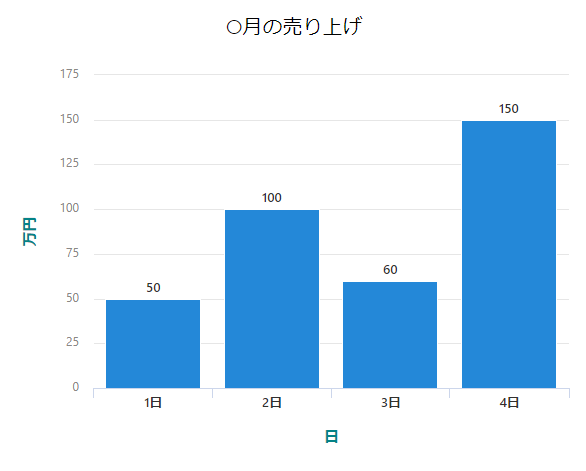
グラフの表示を行ってくれます。

用途

データ表示
データ共有

プロパティ一覧

表の説明

設定項目名 設定方法 説明
実際のページに表示されている名称 ボタンの種類 設定行なうことでの変化や機能を説明しています。

プロパティ

​

グラフの種類
複数項目から選択 グラフのデザインを変更できます。
データ
データの種類 複数項目から選択 データを入力、このSharePointリストからデータを取得を選ぶことができます。
レイアウト
横軸 テキストボックス グラフの横軸のラベルを入力できます。
縦軸 テキストボックス グラフの縦軸のラベルを入力できます。

データの種類

データを入力

手入力でグラフに表示したいデータを入力します。
最大12個まで入力可能です。

このSharePointリストからデータ

SharePointリストからデータを取得してデータを表示します。
SharePointリストに連携しているためデータは自動的に更新されます。

コメント


Warning: Undefined array key 4 in /home/c5987872/public_html/ylifesite.net/wp-content/themes/sango-theme-poripu/library/functions/prp_content.php on line 21

Warning: Undefined array key 4 in /home/c5987872/public_html/ylifesite.net/wp-content/themes/sango-theme-poripu/library/functions/prp_content.php on line 33